
What three customer projects taught me about vCenter 9 upgrades
Three customer projects, three different environments, and the same pattern each time: the upgrade plan was fine, and what cost the time was something small that had been sitting in the environment for years, or a message that didn’t mean what it seemed to say. This post collects the findings I’d want to know before the next vCenter 9 upgrade, in the order you’d run into them.
Each one links to the full write-up on docs.hollebollevsan.nl, with the KBs and step-by-step fixes.
Old host profiles stop the upgrade at the precheck
The vCenter 9 pre-upgrade check stops with an error, not a warning: “Source vCenter Server has unsupported version of host profiles.” The catch is what “version” means here. It’s the ESX version of the host the profile was extracted from, not of the hosts it’s attached to. A cluster fully on ESX 8 can still trip this with a profile extracted back on 7.0.
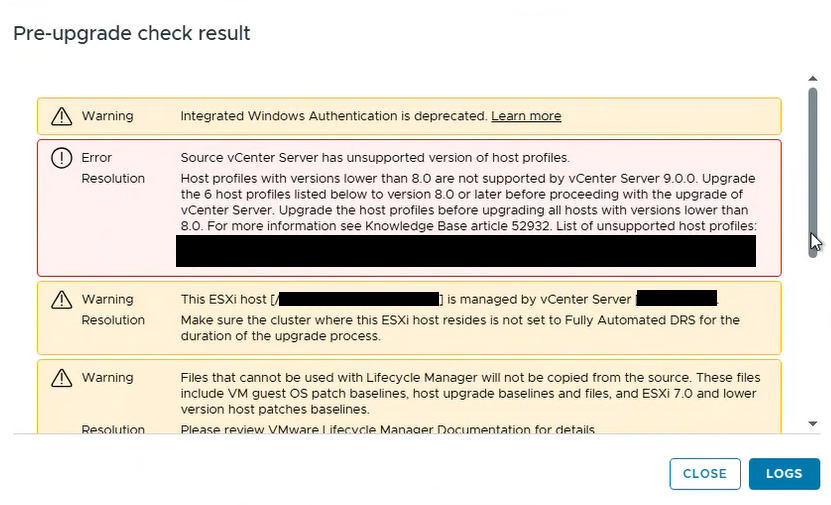
If a profile is still in use, extract a new one from an 8.0 host and remediate against it. If it isn’t, delete it. In the case I saw, none of the flagged profiles were attached to anything. Check this well ahead of the window: host profiles below 8.0.
Set DRS to Manual. Never turn it off.
For a manual vCenter upgrade, you don’t want the new appliance’s host moving things around mid-upgrade. Disabling DRS looks like the simple way to get there, and it’s the wrong one. Turning DRS off deletes the entire resource pool hierarchy, which doesn’t come back when you turn it on again, and on a Supervisor cluster that can leave the cluster unrecoverable. The precheck itself warns about Fully Automated DRS, but it doesn’t tell you what not to do about it. Manual or Partially Automated gets you the same result with none of that: manual vCenter upgrade.
Run VDT and lsdoctor before you plan the window
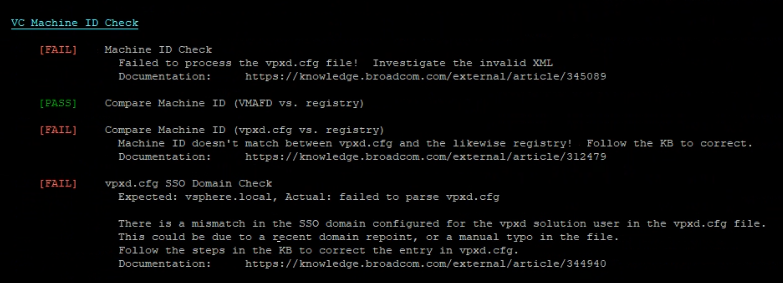
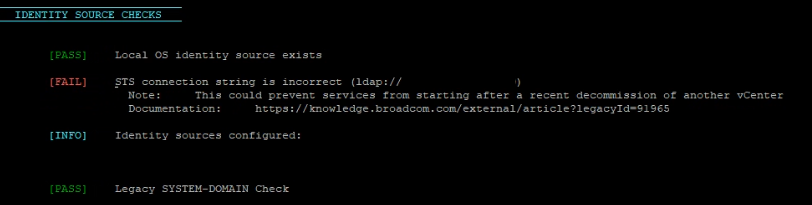
A healthy-looking vCenter can be carrying problems that only surface on the restart an upgrade forces. Those checks turned up some useful findings, and one result that needs no action at all:
- Malformed
vpxd.cfg. VDT reported that it couldn’t processvpxd.cfg, and the SSO domain check failed along with it, on a vCenter that was running completely normally. That’s becausevpxdonly re-parses the file at startup. The risk is the next restart. Don’t default to deleting the whole<vcls>block if it holds live configuration: the details. - STS connection string pointing at the vCenter’s own IP. Not service-impacting today, but the documented failure is services not restarting. Here it correlated with a missing PTR record, so fix reverse DNS first and then the connection string.
cs.identity Missing Node ID. This one is a FAIL you should leave alone on vCenter 8. The Identity Broker component it belongs to doesn’t exist yet, so there’s nothing to fix. Only act on it if it’s still there after the 9.1 upgrade: the details.

“Cannot find vSphere HA master agent”: wait first
Right after a vCenter 9 upgrade, several clusters showed this alert. It’s an alarming thing to see straight after a change, and the instinct is to start reconfiguring HA. In my case it cleared on every cluster without intervention, as soon as the vLCM image tasks on that cluster completed or timed out.
Watch Recent Tasks before you touch anything. Broadcom puts the wait at one to two hours and notes that toggling HA before then doesn’t help. If a cluster is still stuck after its tasks are done, there’s an ordered list of what to check.
Assignable: No, with all your capacity free
Assigning vCenter its 9.x license in VCF Operations can show “No licenses are assignable”, with the license at 0 cores used and everything apparently available. It looks like a bug. Hover over the No and the tooltip gives the real reason: the license needs a certain allocated capacity.
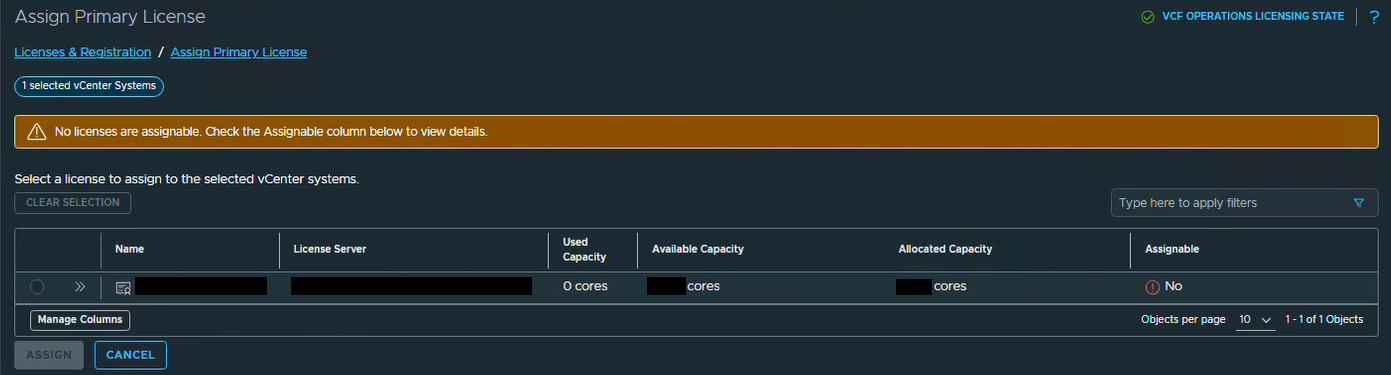

Assignment covers the whole vCenter at once, and VCF Operations compares what the vCenter needs against the license’s allocated capacity, not against what’s free. That requirement counts every managed host, ESX 8 hosts included, at a minimum of 16 cores per CPU. So it can be higher than your real core count. vCenter runs in 90-day evaluation mode in the meantime, so check the tooltip straight after the vCenter upgrade: how to work out the number and close the gap, with a lab-verified PowerCLI snippet.
One more, not from these projects: check for a past vLCM reset
This last one I haven’t seen in the field, but it belongs on the list because the outcome is data loss. Broadcom published a critical advisory on 9 October: if the vLCM database was ever reset while on vCenter 8.0 U3 or 9.0.x, upgrading to 9.1.0 or 9.1.1 deletes the Supervisor Control Plane VMs and Foundation Load Balancers from inventory.
If you run a Supervisor, check every vCenter before the upgrade, whether or not anyone remembers a reset. VDT flags it, and KB 455737 has a checker and a fix. Take a Supervisor backup too, because recovery depends on it: the full check and recovery path.
What they have in common
Most of these are cheap to deal with before the window and expensive during it. And the health checks and the error text are only a starting point: read what the tooltip, the KB or the log actually says before you act on it.
The field notes keep growing with each project, and they cover plenty more than this selection. If you’ve run into something that belongs on the list, or you’re seeing something different, let me know.